Jev Is Not an LLM: What a Model That Only Answers Questions Is Good For
In September, TypeSafe released a model called Jev and called it a "System One" model, which is a new label for an old wish: a model that decides things without writing anything. I'd spent the summer wiring chat models into small tools and parsing their paragraphs back into actions, so a model that skips the paragraph was worth a few weekends. I built four Chrome extensions on it, and three are on the Chrome Web Store as of this week.
This is the explanation I wanted when I started: what Jev is, where it stops being an LLM, and what it was like to build on.
What Jev is
You send Jev a block of state and a set of typed questions. It sends back one answer per question, with probabilities. That is the whole API.
There are three question types. A choice picks one option from a list you wrote, up to 255 of them, and returns a probability for every option plus a confidence. A score places the state on a scale of two to ten levels you described in words, and it can land between levels. A yes/no question, which TypeSafe calls a noul and Vercel's gateway calls a boolean, returns a single probability. Every question in a call is answered in one pass, so a tenth question costs tokens but no extra time.
This is what Slop Radar sends about every LinkedIn post, trimmed:
export const QUESTIONS = {
  slop: {
    type: 'score',
    instructions: 'How much does this LinkedIn post read like generic AI-generated "slop" rather than something a person actually wrote?',
    criteria: [
      'Clearly human: specific, first-hand, uneven natural voice',
      'Mostly human, maybe lightly polished',
      'Unclear or mixed',
      'Likely AI-written: templated structure, generic insight',
      'Obvious AI slop: formulaic hook, one-line "broetry", buzzwords, empty engagement bait',
    ],
  },
  hook: { type: 'boolean', instructions: 'Does it open with a generic attention-grabbing hook or cliffhanger line?' },
  bait: { type: 'boolean', instructions: 'Does it end with engagement bait ("Agree?", "Thoughts?", "Repost if…")?' },
  specific: { type: 'boolean', instructions: 'Does it include first-hand details a template could not produce?' },
};
Back comes { answers: { slop: { probabilities: [...] }, hook: { probability: 0.94 }, ... } }. My code adds the two human levels, adds the two slop levels, and only commits to a tag when one side holds 60% or more. Jev never sees the tag, only the question.
TypeSafe's published numbers are 70 to 500 milliseconds end to end and $0.042 per million input tokens, with output free. Each extension talks to Jev with the user's own key, straight to TypeSafe or through Vercel AI Gateway. There's no server of mine in between, and an evening of LinkedIn comes to under a cent.
How it is different from an LLM
The obvious difference is that Jev cannot write. No reply, no summary, no code, no explanation of why it picked what it picked. If you need text out, it's the wrong tool, full stop.
The less obvious difference is what that buys you. When I built an email triage agent earlier this year, the trick that made it safe was forcing the chat model to fill in a JSON form so plain code could hold the lever. That trick is a workaround. The model is still generating tokens, and you're still hoping it generates the shape you asked for. Jev has no mode in which it could produce anything outside your schema. There's no "sorry, I can't help with that" and no markdown fence around the JSON. An invalid answer isn't a rare failure; it isn't possible.
Then there are the probabilities. A chat model asked for a confidence number gives you a number it made up in the same breath as the answer. Jev's confidence is the thing it's trained to produce, and TypeSafe says it's calibrated, with the caveat that calibration is a property of many predictions, not any single one. In practice that let me put thresholds in code instead of in prompts. Intent Guard only calls a page off-task when the off-task probability reaches 0.6. Jev Voice only acts on a half-spoken command when the "is this complete?" answer is above 0.7. Those are numbers I can tune against a test set, which I could never do with "please respond only with HIGH or LOW".
And speed. From inside Jev Voice, with a real key, "search for how long does a levain take" ran in 477 ms and "click the history tab" in 726 ms, including speech recognition, the round trip and the click. Recipe Mode read an ingredient line back in 262 ms. I've never seen numbers like that from a chat model doing the same job.
What it cannot do, and I hit all of these: it takes instructions literally, so a negation in a question is a trap you have to test for. It can't count or do date arithmetic. Accuracy drops when the state carries text the question doesn't need, so you filter in code first and send only what matters. And it is a model, so it can still be confidently wrong. Two papers in September showed how: one found that renaming two options from "0/1" to "no/yes" flipped the majority of answers on a workflow dataset while the type-error rate stayed at zero, and another found that adding a naturally worded sentence of context flipped 61% of previously correct decisions. Schema-safe is not the same as correct. The schema removes one whole class of failure and leaves the others where they were.
What I made
Four extensions, one shared client, all MIT. Each one does a job where the answer is always one of a list the extension can build from the page.
Slop Radar
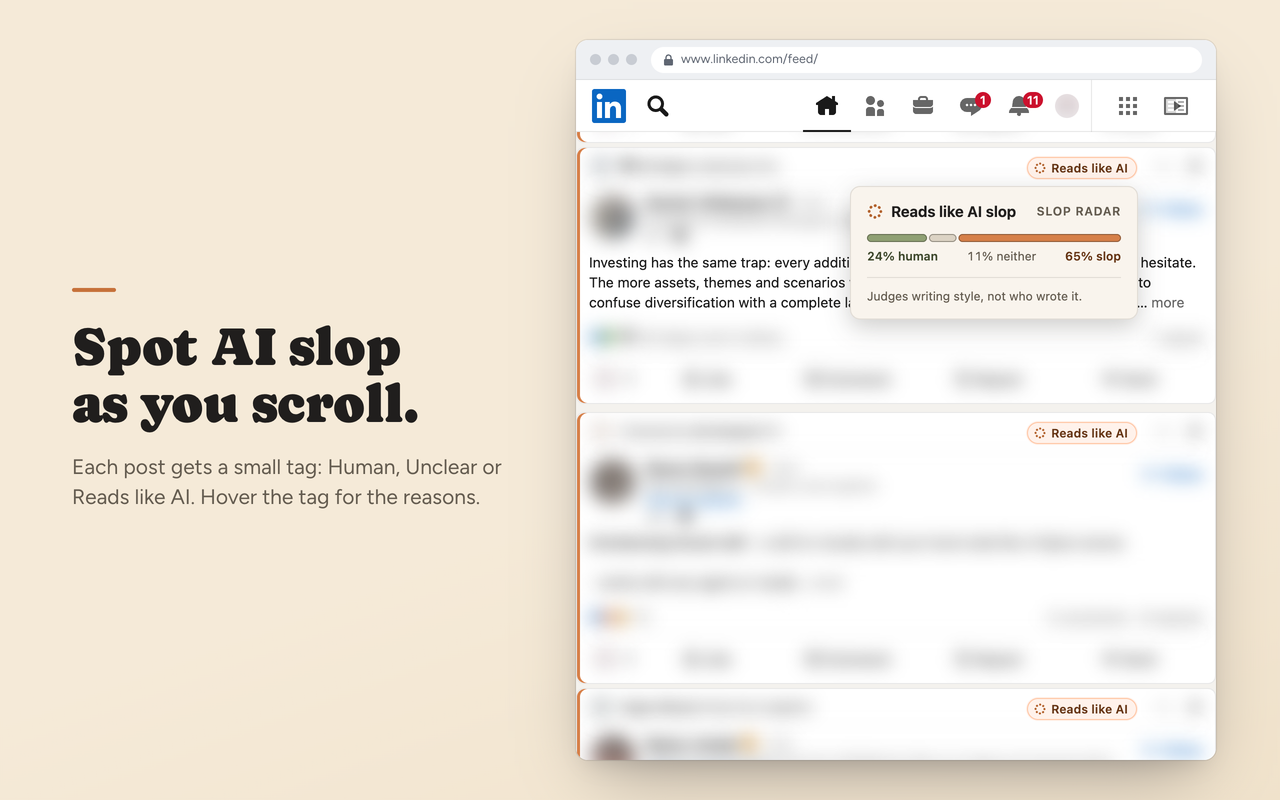
Each post in your LinkedIn feed gets a tag as it scrolls into view: Human, Unclear or Reads like AI. Hover it for the meter and the signals behind the call. The questions above are the whole brain. It judges writing style rather than authorship, and the popover says so, because someone writing in LinkedIn's house style gets tagged too.
It is also the one at the mercy of LinkedIn's markup. The day before I submitted it, LinkedIn started serving a second shape for posts and the top of my feed went untagged. A second selector and eight tests later it shipped as 1.3.0.
Intent Guard
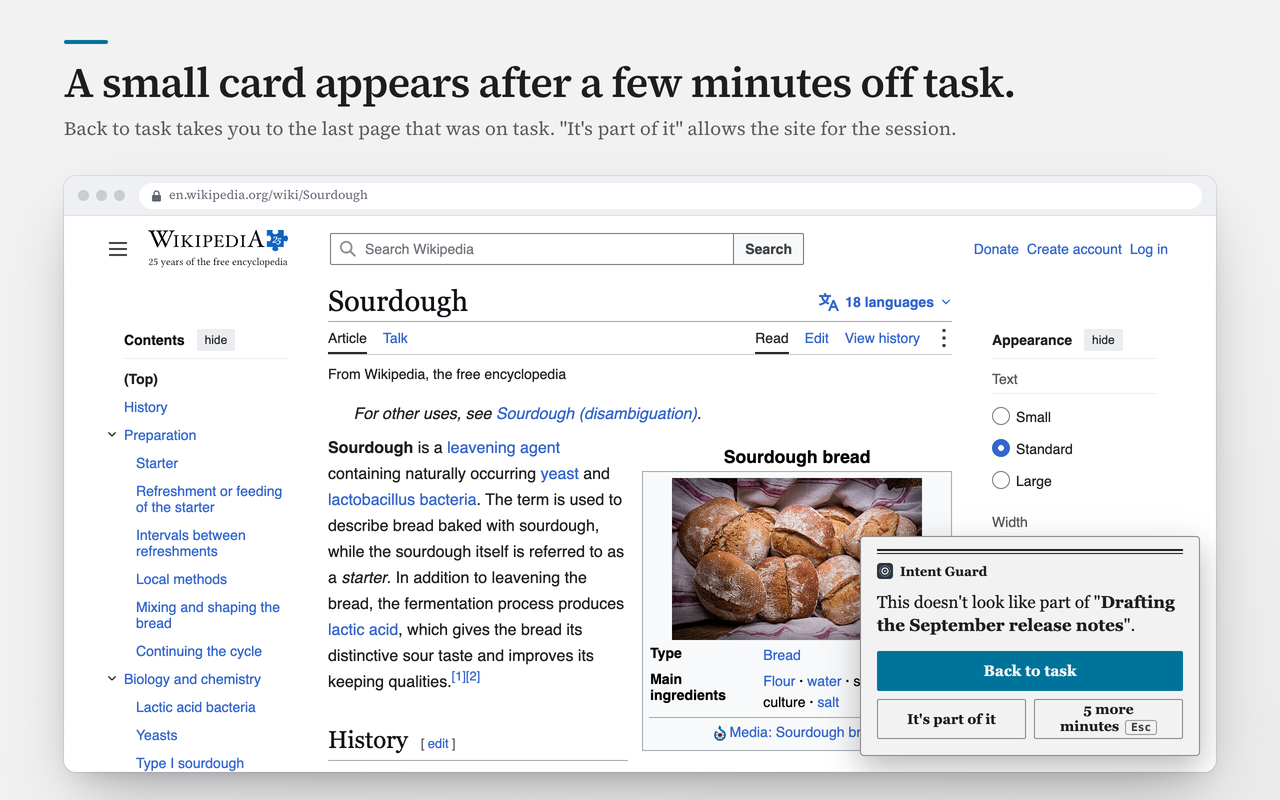
You type what you're working on. Every page you open gets one score question: how much does this page help with that task? Wander past your chosen limit, 1 to 10 minutes, and a small card appears with Back to task, It's part of it, and 5 more minutes. Nothing is blocked. Blockers judge domains, and the docs I need live on the same site as the video I shouldn't be watching.
Only the origin and path, the title, and the heading and description leave the browser. Webmail, banking, government and health sites, anything with a password field, and any site you add are never sent at all.
Recipe Mode
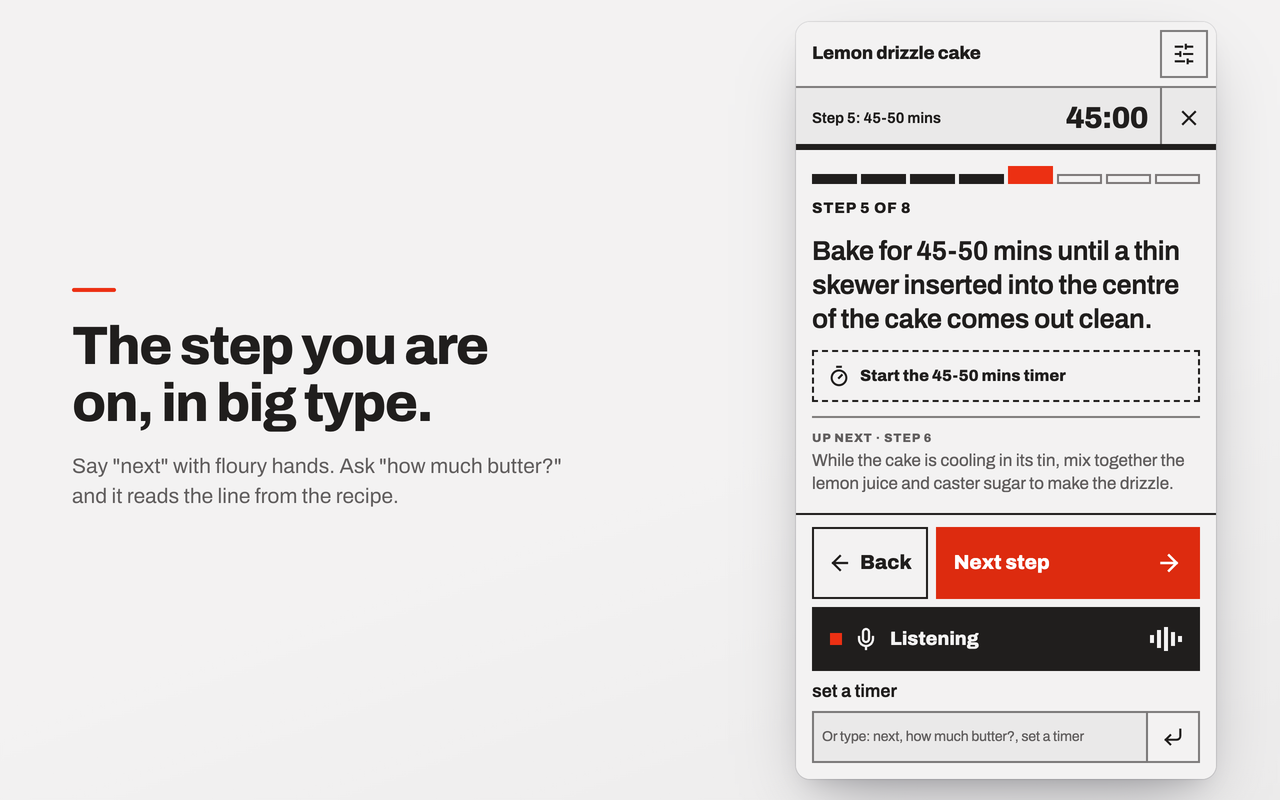
Open a recipe and the side panel shows it one step at a time in big type, reads it aloud and outlines the step on the page. Steps, timers and the ingredient list work with no key. The key is for commands: "how much butter?" is a choice between the ingredient lines, "set a timer" is a choice between the times in the step, and "honey, pass the salt" is a choice whose right answer is none of the above. Every answer is a pick from the page, so it can't tell you to add an ingredient the recipe doesn't have.
Jev Voice
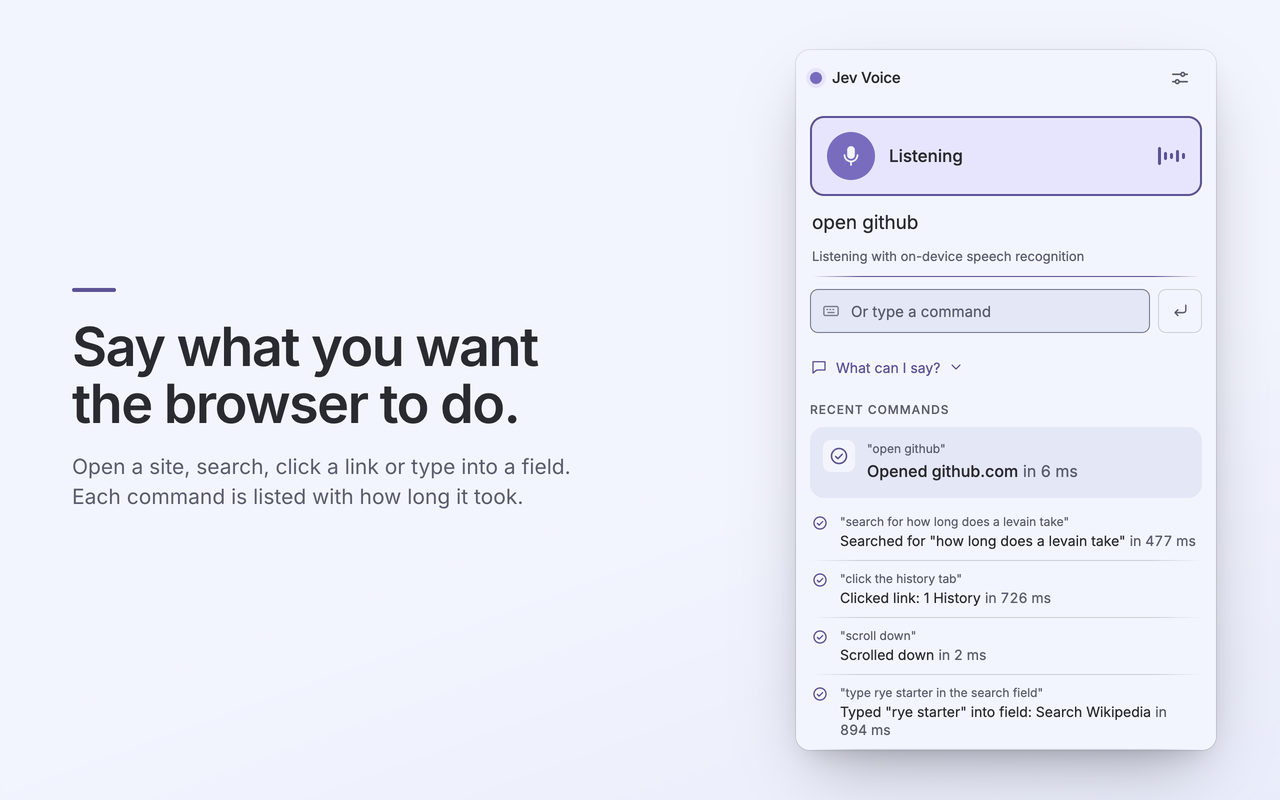
Voice control for the browser: open sites, search, click links, fill in forms. Every candidate link and field on the page is sent as a labelled option, "3rd link: History", and Jev picks. Each partial transcript also carries the question "is this command complete?", so "scroll down" fires before you've finished saying it, while searches and typing wait for the final words because the words are the payload.
Jev Voice isn't on the store yet. New publisher accounts get a handful of slots, the other three took them, and it installs from the GitHub release in the meantime.
Try them
- Slop Radar: Chrome Web Store · github.com/dgr8akki/slop-radar
- Intent Guard: Chrome Web Store · github.com/dgr8akki/intent-guard
- Recipe Mode: Chrome Web Store · github.com/dgr8akki/recipe-mode
- Jev Voice: github.com/dgr8akki/jev-voice, GitHub release until a store slot opens
- The shared client: github.com/dgr8akki/jev-shared
You'll need a key from TypeSafe or Vercel AI Gateway. The settings page that opens on install walks you through it, and each extension tries the key once before keeping it.